
General Settings
You can make the following settings in the menu Edit - General Settings:
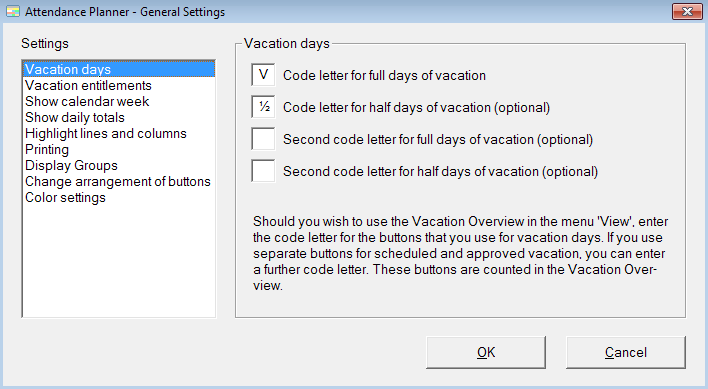
Vacation days
Do you wish to use the Vacation Overview in the menu View, you can enter the code letter for the buttons that you use for full and half vacation days. If you use separate buttons for scheduled and approved vacation, you can enter a further code letter. These buttons are counted in the Vacation Overview.
Vacation entitlements
You can specify whether you want to enter vacation entitlements in menu option Edit - Employees with or without decimal. You can select the beginning of the vacation year and when the residual leave expires.
Show calendar week
You can specify whether the calendar week is displayed in the heading of the monthly overview.
Show daily totals
You can specify for which reasons for presence/ absence you want to display a daily total at the lower edge of the main window.
Highlight lines and columns
You can select whether you want to highlight the current line and column. Furthermore, you can highlight headlines.
Printing
You can select whether grid lines will be printed. When you print the monthly overview you can select whether the calendar week is printed in the heading, and whether a legend of the buttons is printed on the end.
Display Groups
In order to avoid paging through long lists of employees, the employees can be divided into groups. If you select the option Use Display Groups the additional menu option Display Groups is added to the menu Edit.
Change arrangement of buttons
You can change the order of the buttons.
Color settings
You can modify the color settings.
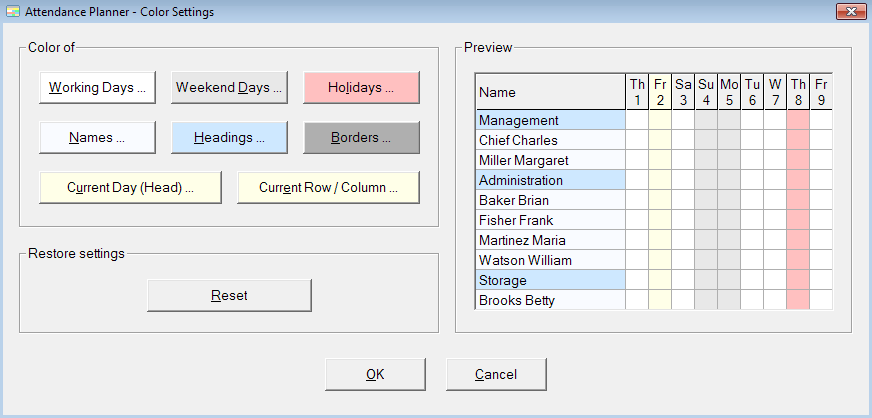
Click a button and select a color. You can see the settings in the preview window on the right-hand side. You can restore the standard settings with the button Reset.